Is Snapchat deleting Memories? The 5 GB limit and January 2027, explained
Short answer: Snapchat is not deleting your Memories. You get 5 GB of Memories storage for free. If you have more than that and don't buy a storage plan, then starting in January 2027, Memories that are more than one year old and are not part of your oldest 5 GB will be archived. Archived Memories stay on Snapchat and still show as thumbnails, but you need to upgrade your storage to open, edit or share them. Your Memories from the last year and your oldest 5 GB stay open as normal (Snapchat Support, page last edited 8 September 2026).
You can avoid the archive for free by downloading a copy of your Memories before then. Snapchat itself lists downloading as one of your options.

Time-sensitive. Snapchat has changed this policy before. Facts on this page were checked against Snapchat's help center on 29 October 2026. We re-check it before January 2027.
What stays open and what gets archived
Snapchat splits your Memories into three groups:
| Group | What happens from January 2027 if you're over 5 GB and don't upgrade |
|---|---|
| Your oldest 5 GB of Memories | Stay open |
| Memories saved within the last year | Stay open |
| Everything in between (older than one year, not in your oldest 5 GB) | Archived: stored, shown as thumbnails, locked until you upgrade |
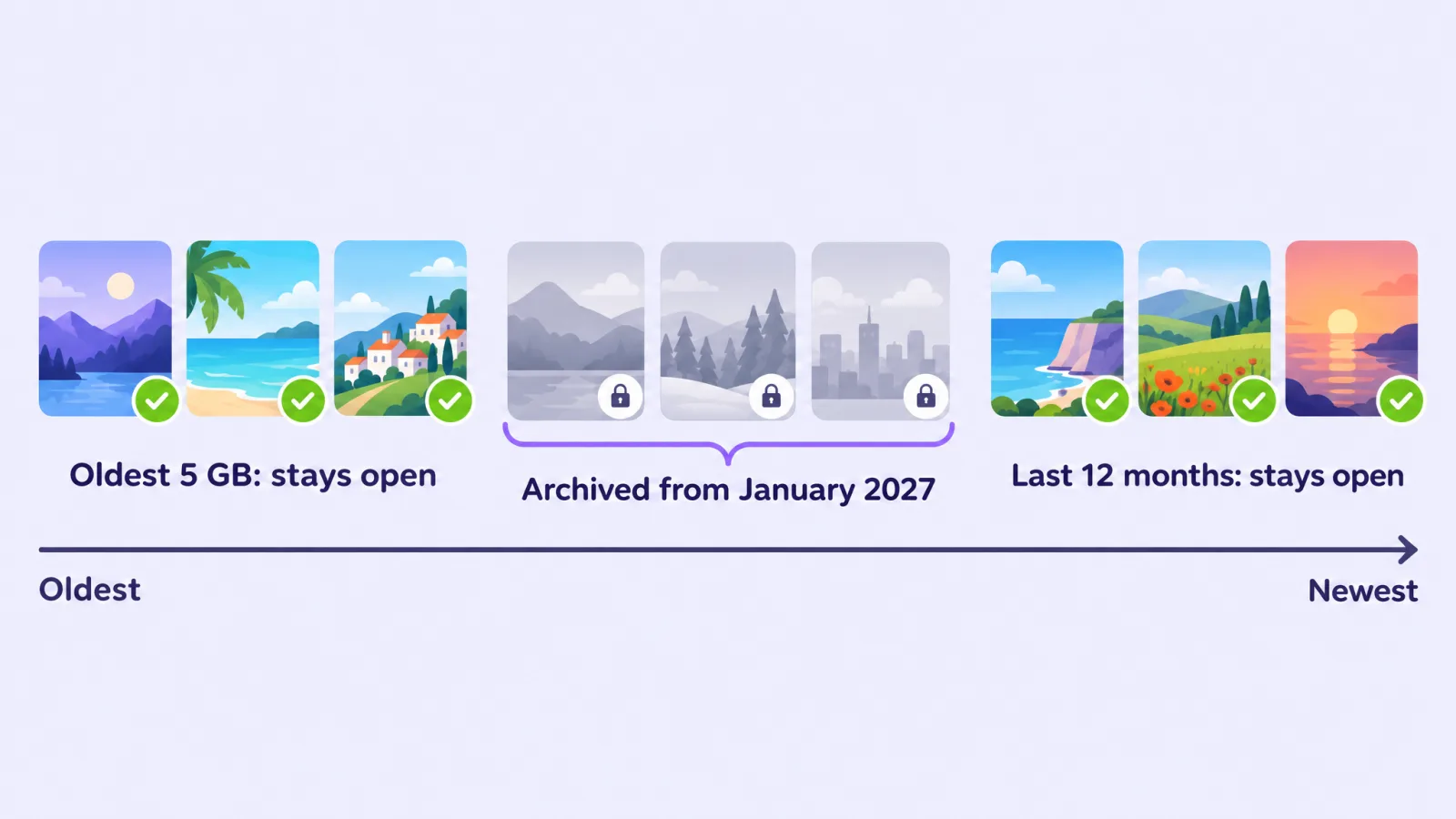
An example. Say you started saving Memories in 2016 and have 20 GB today. Your first 5 GB (perhaps 2016 to 2018) stays open. Your last 12 months stay open. The years in the middle become thumbnails you can see but can't open without a plan. (The real split depends on how much you saved each year.)
Snapchat also says that no Memories will be archived before January 2027, and that it will give advance notice in the app before anything changes for you. It has not published an exact day.
Am I affected? Check your Memories storage
Snapchat's steps (Snapchat Support):
- In My Account, tap the gear icon to open Settings.
- Scroll down to My App.
- Tap Memories and look under Cloud Storage.
If you have more than 5 GB saved, you'll also see a notice in the Memories section of the app. Snapchat says that if you don't see a banner offering storage upgrades, your Memories stay stored as they are today, and you'll be told when you're eligible for a plan.
For most people nothing changes. In its announcement, Snap said "the vast majority" of Snapchatters have less than 5 GB of Memories (Snap Newsroom).
Your three options
1. Do nothing (fine if you're under 5 GB)
If your Cloud Storage shows less than 5 GB, there is nothing to do. It's still smart to keep a copy of your Memories somewhere else, because deleted or lost Memories can't be recovered by Snapchat Support (Snapchat Support).
2. Pay for more storage
Is a plan worth it for you? We compare the options in Snapchat Memories storage plans: prices and the free option.
Snapchat's plans, as listed on its help page (US prices; they vary by country, so check the app):
| Plan | Memories storage | Price (US) |
|---|---|---|
| Free | 5 GB | Free |
| Memories-only plan | 100 GB | $1.99 a month or $20 a year |
| Snapchat+ | typically 250 GB | see app |
| Lens+ | same as Snapchat+ | see app |
| Snapchat+ Platinum | 5 TB | see app |
To upgrade, open Memories and tap Upgrade Storage. On a Snapchat+ Family plan, each member gets the storage included with the plan.
If you cancel a paid plan later and still have more than 5 GB, Snapchat says the app shows your storage status and your options.
3. Download your Memories (free)
You can download all your Memories with Snapchat's My Data tool on accounts.snapchat.com and keep them on your own computer, drive or photo service. Snapchat says it aims to deliver exports within 7 days, and large ones can take longer (Snapchat Support), so don't leave this to the last week of December.
Our step-by-step guide: How to download all your Snapchat Memories.
Downloading a copy does not remove anything from Snapchat, and it doesn't lower your storage use. It just means the archive no longer matters to you, because you have every memory yourself.
The catch with downloading: the export comes back broken
The export gives you your files, but not quite as you saved them:
- Captions, drawings and stickers come as separate overlay files, not on the photos.
- Dates aren't inside the files, so galleries often show the day you downloaded them.
- Places are only in a separate JSON file, so nothing shows on a map.
- Long videos can come as several short clips.
Memories Fixer puts all of that back in your browser: captions burned in, real dates and time zones, places, and split videos joined. Nothing is uploaded. It's free, for photos and videos.
What changed since the announcement
If you read about this in 2025, you may have heard something different. Here is what Snapchat has said, in order:
- 26 September 2025: Snap announced Memories Storage Plans and said it would give 12 months of temporary storage for Memories over 5 GB (Snap Newsroom).
- October 2025: reporting at the time said that if you were over the limit and didn't pay, your oldest Snaps would be kept and the most recent ones deleted (TechCrunch).
- Now (help page edited 8 September 2026): Snapchat says it will not automatically delete Memories because you don't upgrade. From January 2027, over-limit Memories older than a year are archived, not deleted, and your most recent year stays open (Snapchat Support).
Many pages still say Memories will be "deleted in September 2026". That is out of date.
Checklist before January 2027
- Check your storage under Settings → My App → Memories → Cloud Storage.
- Make sure your Memories are backed up in the app: Settings → My App → Memories → Backup Progress should say "Complete" (Snapchat Support).
- Request your export with Export your Memories and Export JSON files turned on, all dates.
- Download every ZIP file in the list, not just the first one.
- Fix the export so captions, dates and places are back (Memories Fixer).
- Keep two copies in different places, for example a computer plus an external drive or a cloud photo service.
Frequently asked questions
Is Snapchat still deleting Memories in 2026?
No. Snapchat's help page says it will not automatically delete your Memories because you do not upgrade, and that no Memories will be archived before January 2027. Posts saying Memories are deleted in September 2026 are based on an older version of the plan.
Will Snapchat delete all my Memories if I don't pay?
No. If you're over 5 GB and don't pay, Memories older than one year that aren't in your oldest 5 GB are archived from January 2027: still stored, shown as thumbnails, and locked until you upgrade. Your oldest 5 GB and your last year stay open.
How do I know if my Memories are over 5 GB?
Go to Settings → My App → Memories and look under Cloud Storage. If you're over, you'll also see a notice in the Memories section of the app.
When exactly does the archive start?
Snapchat says "starting in January 2027" and that it will give advance notice in the app. It hasn't given a specific date.
Is my phone's camera roll part of this?
No. Snapchat says it does not back up your camera roll media to Memories (Snapchat Support). Photos that live only in your camera roll aren't affected by the archive, but Snapchat doesn't keep a copy of them either.
Can I get archived Memories back later?
Snapchat says archived Memories remain stored, and you can open them by upgrading your storage or access them by downloading your Memories.
Will deleting Memories free up space?
Yes, but deleted Memories are gone for good: Snapchat says its servers erase them and Support can't recover them (Snapchat Support). Only delete after you've checked your downloaded copy.
Related guides: How to download all your Snapchat Memories
Last checked: 29 October 2026 against Snapchat's help center. Memories Fixer is not affiliated with, endorsed by, or sponsored by Snap Inc. Snapchat is a trademark of Snap Inc.