How to download all your Snapchat Memories (2026 export guide)
Short answer: on a computer, go to accounts.snapchat.com, open My Data, turn on Export your Memories and Export JSON files, leave the date range off, confirm your email and click Submit. When Snapchat emails you, download every ZIP file in the list. The first ZIP (the one with no number at the end) holds the dates and places of all your Memories; the others hold the rest of the photos and videos.
That gives you everything. The phone app can also save Memories, but only 100 at a time.

Two ways to save your Memories
| My Data export (website) | Export from the app | |
|---|---|---|
| How many | All of them at once | Up to 100 per round (TechCrunch) |
| Captions and stickers | Separate overlay files | On the photo |
| Date taken | In a separate JSON file, not in the files | The day you save them |
| Place | In the JSON file | Not kept |
| Best for | A full backup before the 5 GB change | A few favourites |
For a full backup, use My Data. The steps are below.
Step by step: request your export on a computer
Snapchat recommends doing this from a computer rather than a phone, and trying another browser if you run into problems (Snapchat Support).
- Go to accounts.snapchat.com and log in. (In the app you can also reach this page from Settings → My Data.)
- Click My Data.
- Under Select data to include, turn on Export your Memories.
- Also turn on Export JSON files. This is the part that holds each memory's date and place. Without it, there are no places, and dates can only be guessed from the files themselves.
- Turn the date range off to get everything. (Snapchat notes that longer ranges take longer to prepare.)
- Confirm the email address where you want the notice.
- Click Submit.
About "Request Only Memories": Snapchat's help page describes a Request Only Memories button for a Memories-only export. Developers report that this export doesn't include the JSON file, so your places and the list of dates are missing (SnapchatMemoriesCaptionAdder). If you want dates and places, make sure Export JSON files is on and submit the full request.
You don't need the other data types (chats, friends, and so on) for your Memories. Leaving them off keeps the export smaller.
How long it takes
Snapchat says it aims to deliver data within 7 days and that large downloads can take longer (Snapchat Support). Small exports often arrive much faster. A data download request can't be cancelled once it's sent.
When it's ready, you get an email with a link. You can also find it at accounts.snapchat.com/accounts/downloadmydata: choose See exports, then Download. Snapchat doesn't say how long the download links stay valid, so download your files soon after the email arrives.
Download every ZIP file
Big libraries come as several ZIP files:
mydata~1234567890.zip      ← json/, html/, index.html, memories/
mydata~1234567890-2.zip    ← memories/
mydata~1234567890-3.zip    ← memories/
…
Download all of them, keep their names, and put them in one folder. If you skip the first file, you lose the places and the list of dates. If you only take the first file, you miss most of your photos and videos (CodingDK).
Plan the disk space. You need room for the ZIP files, and about the same again if you make fixed copies.
Safari on a Mac may unzip files by itself after downloading. That's fine; you'll just have folders instead of ZIP files.
What's inside your export
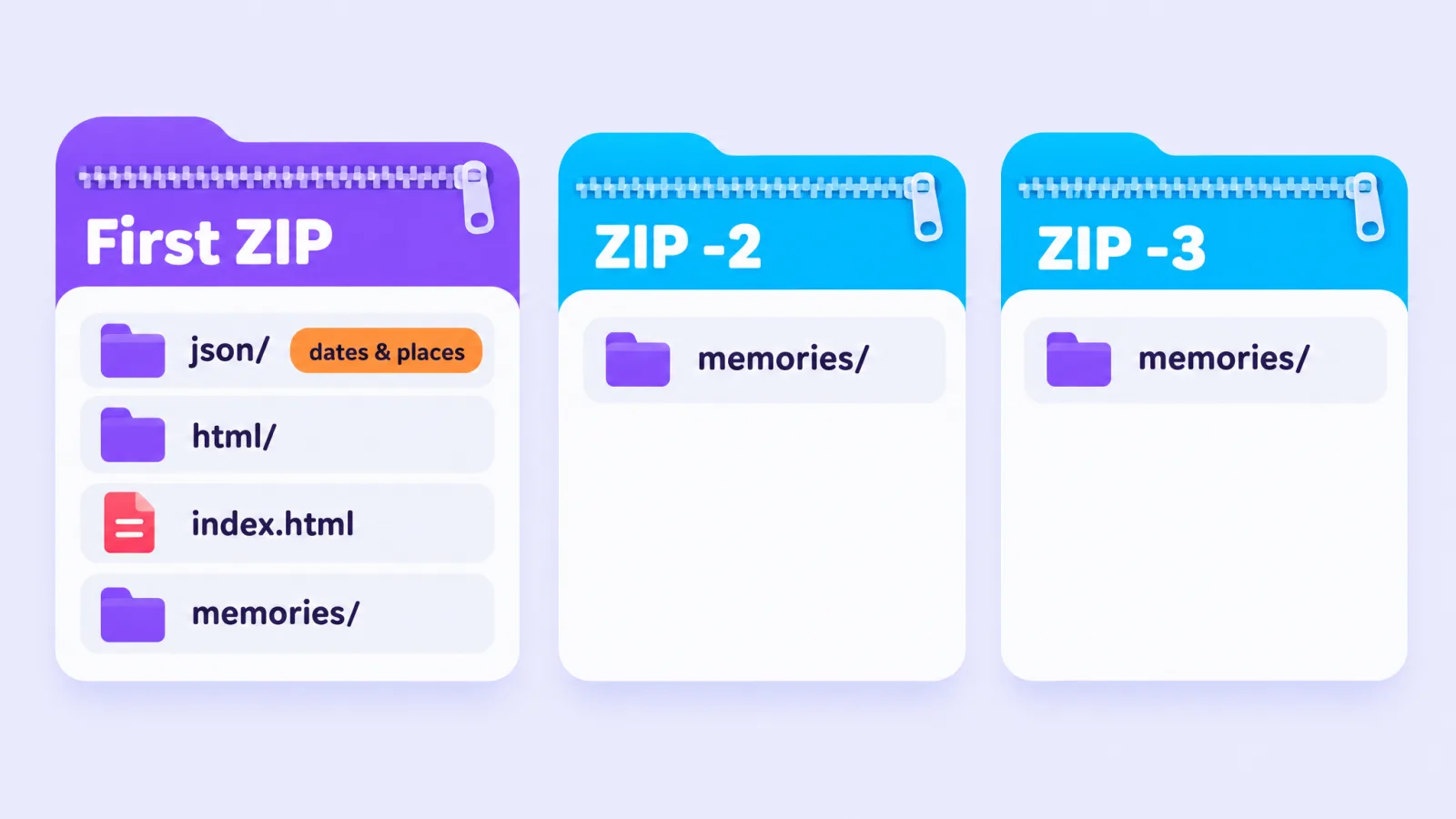
memories/holds your photos (.jpg) and videos (.mp4), named like2024-03-16_<long ID>-main.jpg. The date in the name is a UTC date, so it can be a day off from your local date.…-overlay.pngfiles next to some of them hold the caption, drawings and stickers you added, as a separate layer.json/memories_history.jsonlists every memory with its date and time (in UTC), photo or video, and location.index.htmlandhtml/let you browse your data in a web browser.
Snapchat's help page also describes opening index.html, clicking Memories and downloading from there (Snapchat Support). In 2026 exports the media files are already in the ZIP files, and the download links in the JSON file are empty, so older scripts that fetch Memories from those links no longer work (CodingDK).
What's wrong with the export (and how to fix it)
Your files are all there, but they don't look like your Memories yet:
- Captions and stickers are in separate files.
- Galleries show the wrong day, because there's no date inside the files.
- Places are only in the JSON file, so nothing appears on a map.
- Long videos can be split into several short clips.
Memories Fixer fixes all four in your browser. Drop in all your ZIP files; it reads them where they are, without unzipping, and saves fixed copies sorted into a folder per year, plus a report of what it did. Nothing is uploaded. It's free, for photos and videos.
Where to keep your Memories next
- Move them to Google Photos
- Save them to your iPhone and Apple Photos
- Back them up to an external hard drive
If something goes wrong
The most common problems are below. For every symptom and its fix, see Snapchat data download not working.
- No email arrived. Log in at accounts.snapchat.com and open My Data; your export is listed there even if you typed the wrong email (Snapchat Support).
- The download fails or stops. Use a computer, try a different browser, and check you have enough free disk space.
- There's no
jsonfolder. You probably requested Memories only. Request again with Export JSON files turned on. - Lots of memories seem missing. Check that you downloaded every ZIP file in the list.
- Some years are missing. Open
json/memories_history.json(or look at the file names) and check that your oldest and newest years are there. People with large accounts report exports that left media out without saying so (r/SnapchatHelp). If years are missing, request the export again, or request smaller date ranges. - Windows warns the download "might be harmful". People report this with Memories ZIP files (r/SnapchatHelp). Make sure the link came from Snapchat's own email or from accounts.snapchat.com before you keep the file.
- Snapchat won't let you export because of a security restriction. Users report this after a password change or new login, and that it clears after a few days (r/snapchat; more on the 72-hour wait).
- You get an email about a data request you didn't make. Snapchat says to change your password, turn on Login Verification and store your recovery code right away (Snapchat Support).
Frequently asked questions
Can I download all Snapchat Memories at once on my phone?
In the app, you can export up to 100 at a time. For everything at once, use My Data. You can open accounts.snapchat.com on a phone, but big exports are much easier on a computer.
Does downloading my Memories delete them from Snapchat?
No. You get a copy; your Memories stay in the app.
Does the export include My Eyes Only?
Snapchat doesn't say on its help page. Check your export against the app before you rely on it.
Why are my Snapchat videos split into pieces?
Long videos are stored as several clips, and the export gives you each clip as its own file, each with its own copy of the caption layer. In 2026 exports the clips of one video share the same second and place. Memories Fixer joins them back into one video, for free.
Are the photos and videos full quality?
The export contains the files Snapchat stores for your Memories. Captions and stickers are kept as a separate layer, so the main photo is clean.
Related guides: Snapchat's 5 GB limit and January 2027
Last checked: 29 October 2026. Memories Fixer is not affiliated with, endorsed by, or sponsored by Snap Inc. Snapchat is a trademark of Snap Inc.